How to track competitor website changes without drowning in alerts
, updated · 11 min read · by the Competite team
To track competitor website changes, pick the five or six pages where a competitor’s decisions show up, read them on a fixed schedule, and keep only the changes that mean something. Pricing, the home page, features, the changelog, careers and sign-up carry almost all of it. The tools are the easy part. The hard part is that most changes on a website are noise, and a tracker that reports every one of them soon gets ignored.
Why track competitor website changes?
Because a competitor’s website is where its decisions become public, usually without an announcement. A price rise, a new plan, a feature moved to a cheaper tier, a headline rewritten for your customers, a job ad for a first enterprise salesperson: each appears on a page before it appears anywhere else, and most never appear anywhere else at all.
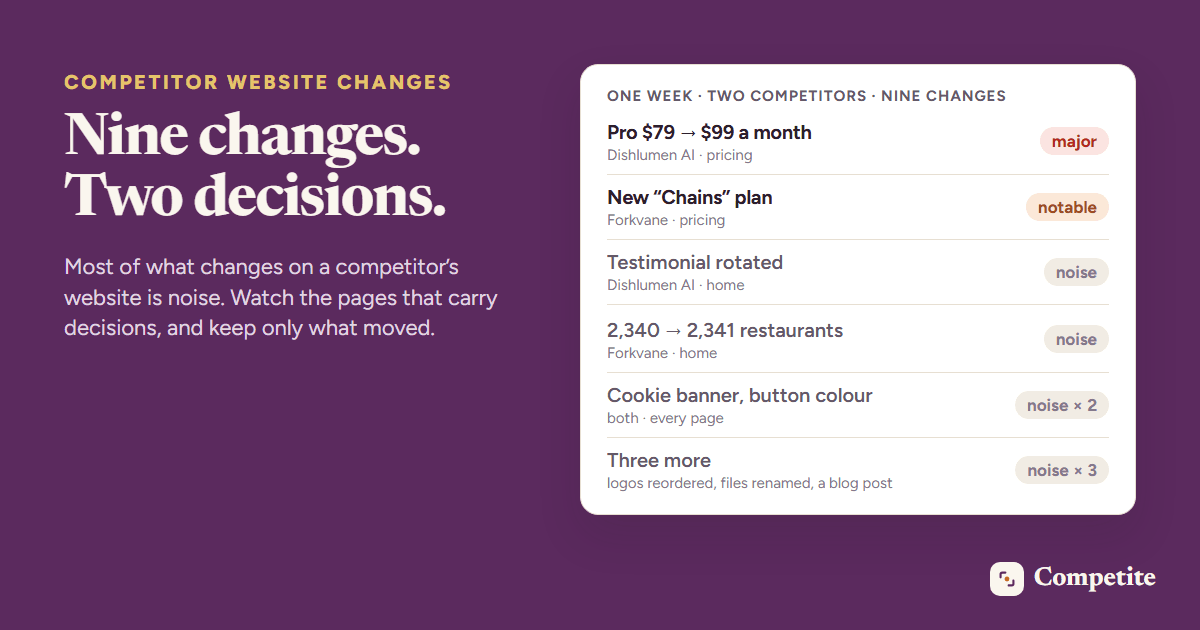
Take one change from the examples on this blog. On 2 September, the fictional Dishlumen AI raised its Pro plan from $79 to $99 a month. There was no blog post, no email to customers and no line in the changelog. Anyone who read the pricing page that week knew. Everyone else found out when a prospect mentioned it, or never did.
That is the case for tracking: the changes that matter most are the ones nobody tells you about. It is also the case against tracking everything, because the same pricing page changes for a dozen reasons that mean nothing, and those are most of the changes a tracker will ever show you.
Which competitor pages are worth watching?
Six pages carry almost every decision a competitor makes in public: pricing, the home page, the features page, the changelog, careers and sign-up. Watch those and leave the rest. The blog, the about page and the legal pages change often and rarely mean anything, with one exception worth a glance: a launch announced on the blog.
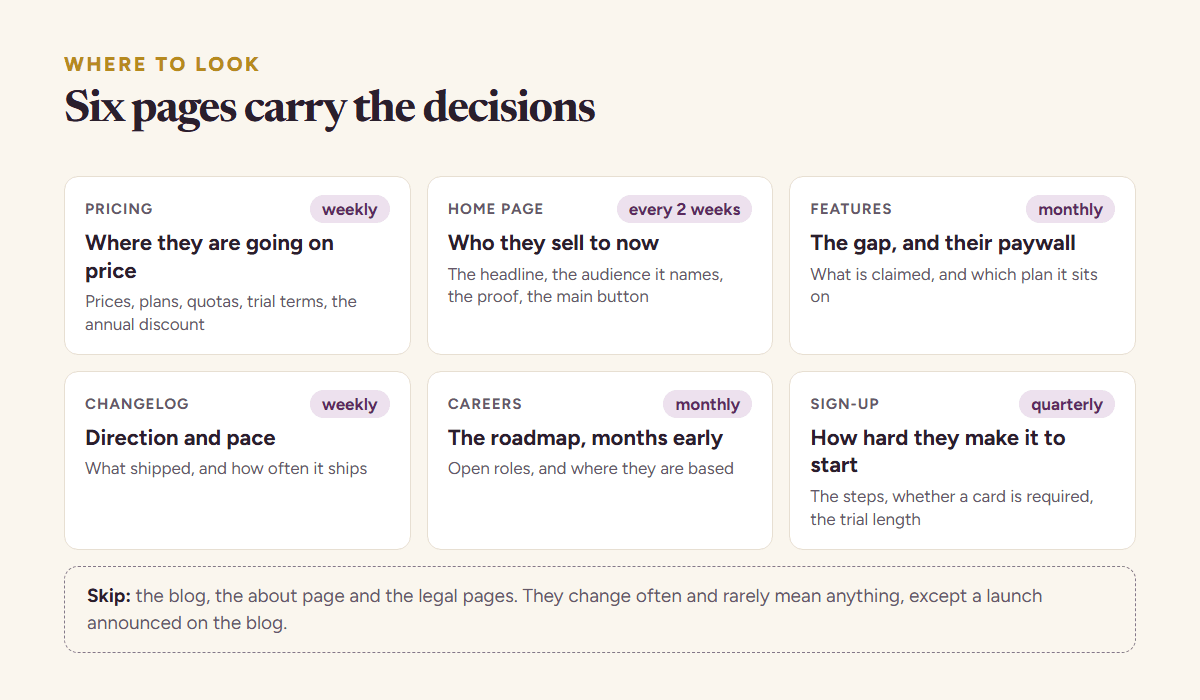
| Page | What changes there | What it tells you | Check it |
|---|---|---|---|
| Pricing | prices, plans, quotas, trial terms, the annual discount | where they are going on price, and which buyer they want | weekly |
| Home page | the headline, the audience it names, the proof, the main button | who they are selling to now | every two weeks |
| Features | what is claimed, and which plan it sits on | the feature gap, and where their paywall is | monthly |
| Changelog | what shipped, and how often | direction and pace | weekly |
| Careers | open roles, and where they are based | the roadmap, months early | monthly |
| Sign-up | the steps, whether a card is required, the trial length | how hard they make it to start | quarterly |
Careers is the page founders skip, and it is often the earliest signal on the list. A first enterprise account executive says a competitor is moving upmarket; three engineers for an integrations team says what the next six months of its changelog will contain. A job ad has to describe the work honestly to attract the right person, which makes it one of the more truthful pages a company publishes.
How to track competitor website changes: four ways
By hand on a schedule, with a page-change watcher, with the Wayback Machine for the past, or with a reader that judges each change. They differ in cost and in who decides whether a change matters. With the first three, that is still you. Only the fourth makes the call before the change reaches you.
| Way | What it costs | What it catches | What it misses |
|---|---|---|---|
| By hand, weekly | about half an hour a week for three competitors | everything you read closely | whatever you skim, and every week you skip |
| A page-change watcher | free tiers exist for a handful of pages; check each tool’s limits | every change on the pages you point it at | whether the change matters: it alerts on all of them |
| The Wayback Machine | free | what a page said months or years ago | anything between its snapshots, which are irregular |
| A reader that judges changes | a subscription | the changes worth acting on, with what they mean | pages it cannot read, such as those behind a login |
By hand works better than it sounds, as long as you keep a copy. Save each page’s text into a document with the date on top, and next week paste the new text underneath. Side by side, the difference is easy to see, and the document becomes the history you will want later. What does not work is reading the page again from memory: you will not remember whether the Pro plan said 30 images or 50.
The Wayback Machine answers a different question: not what changed this week, but what the page said before. Paste a competitor’s pricing address into it and you can often read the page as it was months ago, which is how you learn that a price you thought was new has been there since spring. Its snapshots are taken on its schedule, not yours, so it is a history to look back at rather than an alert.
Why most competitor website change alerts are noise
Because most of what changes on a web page is not a decision. A testimonial rotates, a counter ticks from 2,340 restaurants to 2,341, the year in the footer moves on, a cookie banner is reworded, a test swaps a button’s colour. A watcher comparing raw pages reports all of it, and after the third false alarm in a week, people stop reading the alerts.
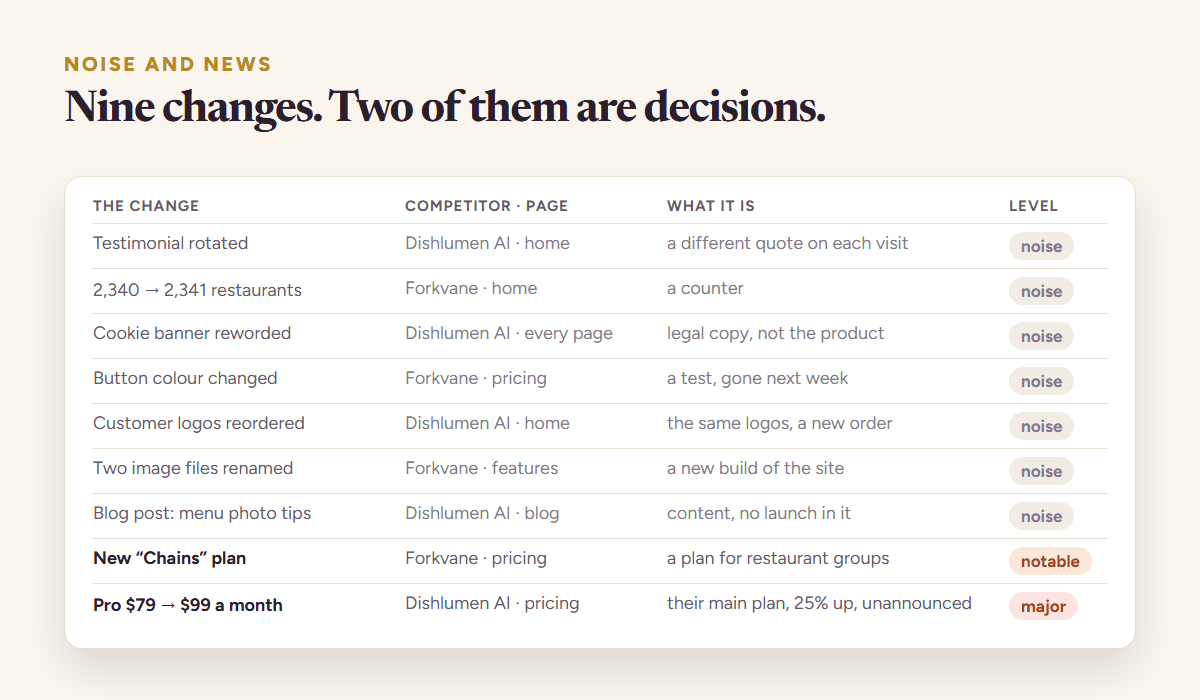
Three habits remove most of the noise before it reaches you:
- Watch the section, not the page. Point the watcher at the pricing table rather than the whole pricing page, and the rotating testimonial underneath it stops counting.
- Strip what always changes. Dates, counters, cookie banners, anything that differs on every visit. Most watchers let you exclude part of a page; do it on the first day, not after the tenth false alarm.
- Weigh the page, not only the change. One changed word on a pricing page is worth more than a changed paragraph on a blog. A rule as blunt as “pricing changes always reach me, blog changes never do” already beats treating every change the same.
What is left after that still needs a judgement, and the judgement is the part a diff cannot make. A pricing page whose “most popular” badge moved from Pro to Starter has changed by two words, and it can matter more than a full redesign.
How to read a competitor website change
Ask four questions of every change that survives the noise: what exactly moved, with the before and the after; who it is aimed at; whether it is permanent or a test; and what it changes for you, as one action. A change that has no answer to the fourth question goes into the log and nowhere else.
| The change | What it usually means | One thing to do |
|---|---|---|
| A price rise on their main plan | there is room above them, or their costs went up | check whether your price now sits too far under theirs |
| A new, cheaper plan | they are losing small buyers, or going after them | compare it with your entry plan, line by line |
| A feature moved to a lower tier | it stopped being a reason to upgrade | check whether you charge extra for the same thing |
| A new headline naming your customers | they are moving into your segment | read their proof for that segment; it is usually thin at first |
| A first enterprise sales role | they are moving upmarket | expect less attention to small buyers within a few quarters |
| A shorter trial, or a card now required | too many trials that never paid | nothing yet; watch whether their price moves next |
The before and the after are the part people skip, and without them a log is useless in three months. “Pricing page changed” tells you nothing. “Pro raised from $79 to $99 a month, read 9 September, was $79 on 26 August” is a fact you can set next to your own price and argue with. The competitor price tracking guide covers what to do in the week a competitor moves its prices. A trial that gets shorter, or starts asking for a card, has a guide of its own: how to detect competitor trials.
A weekly routine for competitor website monitoring
Twenty minutes on the same morning each week is enough for three competitors. Read the alerts or the saved pages, write one line for each change that survived the noise, and put any action on the same list as the rest of your work. Once a month, read the six pages of your two closest competitors in full, alerts or not.
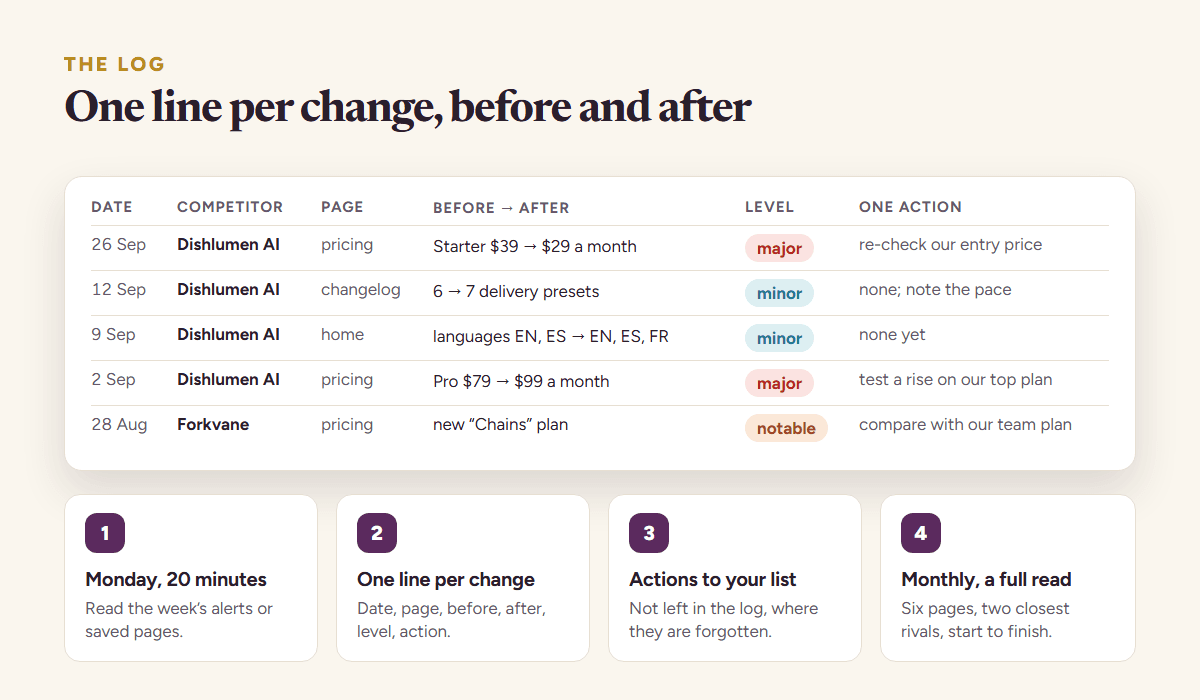
- Monday, twenty minutes. Go through the week’s alerts or saved pages. Discard the noise without reading it twice.
- One line per change. Date, competitor, page, before, after, how much it matters, one action. A line without the before and the after does not go in.
- Actions go on your real list. Not into the tracking document, where they will be forgotten.
- Monthly, a full read. The six pages of your two closest competitors, start to finish, because watchers miss what they were never pointed at.
- Quarterly, the list itself. Is anyone missing, and is anyone on it who no longer competes? How to find competitors has the test.
The monthly read matters more than it looks. A watcher pointed at a pricing table will never tell you that a competitor launched a second product on a new page, because nobody pointed it there. The competitor tracking guide covers the signals that never appear on a website at all, such as funding and press.
What a website change tracker cannot see
Four kinds of change never reach a simple tracker: prices drawn by JavaScript, prices inside images, anything behind a login, and prices that differ by country. All four produce the same symptom, a page that looks unchanged or empty, and all four have the same fix: open the page in a browser yourself before believing the tracker.
- Pages built in JavaScript. Many tools fetch a page’s HTML without running its scripts. If a script draws the pricing table, the tool sees an empty space where the prices are, and an empty space that stays empty looks like a page that never changes.
- Prices inside images. A pricing table or a campaign banner saved as a picture holds no text to compare. Only a tool that reads the words in images will see it change.
- Anything behind a login. Upgrade screens inside the app, the limits shown after sign-up. Do not sign up under false pretences to read them; a public help page or a customer’s screenshot usually says the same thing.
- Prices by country. Some pricing pages show a different currency or number depending on where you are. A tracker in one country sees one version, so note which one you are reading.
The reverse happens too: a tracker reports that a pricing page no longer shows prices, because the page failed to load that day. A tool that says when it could not read a page is worth more than one that quietly records the blank as a change.
Automating competitor website monitoring
Automate once the routine has survived a month and you know which pages matter. Point the tool at the same pages every week, strip the noise before comparing, and have each change judged before it reaches you. An automated tracker that skips the judgement is only a faster way to collect the same unread alerts.
Competite does that on the pages you confirm for each competitor: the home, pricing, features and changelog pages on every run, plus a rotation of the rest. It removes the usual noise before comparing, sorts each change into noise, minor, notable or major, and emails you only the notable and major ones, each with the before and the after, what it means for your product and one action. It reads weekly on the paid plans and monthly on the free one. Start free with one competitor.
Questions people ask
- How can I see if a competitor changed their website?
- Compare the page today with an earlier copy of it. The copy can be one you saved yourself, a page-change watcher’s history, or the Wayback Machine’s snapshots of the address. For prices, compare plan names, numbers and quotas line by line, and write down the date of each reading.
- Can I get an alert when a competitor changes their pricing page?
- Yes. Point a page-change watcher at the pricing table rather than the whole page, exclude the parts that change on every visit, and it will alert you when the table changes. When an alert looks odd, open the page in a browser: a table drawn by JavaScript can read as empty to a watcher.
- How often should I check competitor websites?
- Weekly for pricing and the changelog, every two weeks for the home page, monthly for features and careers, and quarterly for sign-up. For your closest competitor in a fast-moving category, weekly for everything is reasonable; for a distant one, monthly is plenty.
- Is it legal to monitor competitor websites?
- Reading a competitor’s public pages is what any visitor does, and checking them on a schedule is common practice. Automated copying at scale can be restricted by a site’s terms, so keep to a few pages at a modest pace, never get around a login or a paywall, and take legal advice for anything beyond that.
- What is the best free way to track competitor website changes?
- For up to three competitors, a weekly twenty-minute read of their six key pages with the text saved in a dated document, plus a free page-change watcher on each pricing table. The Wayback Machine fills in what the pages said before you started.
See it on your own competitors
Add your product, or just describe the idea. Competite finds the competitors, reads their pages, and writes the comparison with a quote behind every claim. Free, in about three minutes, no card.
Keep reading
Competitor tracking: how to monitor competitors’ prices, features and funding every week
Competitor tracking for founders: the six signals to monitor, how often each one moves, where they live, and what a good alert looks like.
9 September 2026 · 7 min read
Competitor price tracking: what to do the week a competitor cuts a price
Competitor price tracking for founders: what to watch on a pricing page, how to track it by hand or automatically, and the four moves when they cut a price.
15 September 2026 · 8 min read
Competitor pricing analysis: how to read a pricing page like a buyer
Competitor pricing analysis in an afternoon: the eight things to read on a pricing page, how to compare plans that are not alike, and how to set your price.
15 September 2026 · 9 min read
AI competitor analysis: what it reads, what it invents, and how to check it
How to run an AI competitor analysis you can check: what a model reads well, where it invents prices, a prompt to copy, and the free tools that work.
6 November 2026 · 12 min read
A new competitor just launched in your market. What to do first
A new competitor launched in your market: how to read what they actually shipped, decide whether it threatens you, and the four responses worth making.
17 September 2026 · 7 min read
A competitor audit in one day: the checklist, and what it costs to have one done
How to run a competitor audit in a day: what to read on each competitor, a six-part checklist, what the audit should produce, and what a paid audit costs.
15 November 2026 · 7 min read
Competitor monitoring tools: ten compared by what each one watches and what it costs
Ten competitor monitoring tools compared: what each one watches, who it is for, and its entry price as read on the vendor’s own page on 25 November 2026.
25 November 2026 · 11 min read
How to detect competitor trials: when a rival changes its free trial, and what it means
How to detect competitor trials and changes to them: six terms to record, four ways to spot a change, how to tell a test from a decision, and what each means.
25 November 2026 · 10 min read